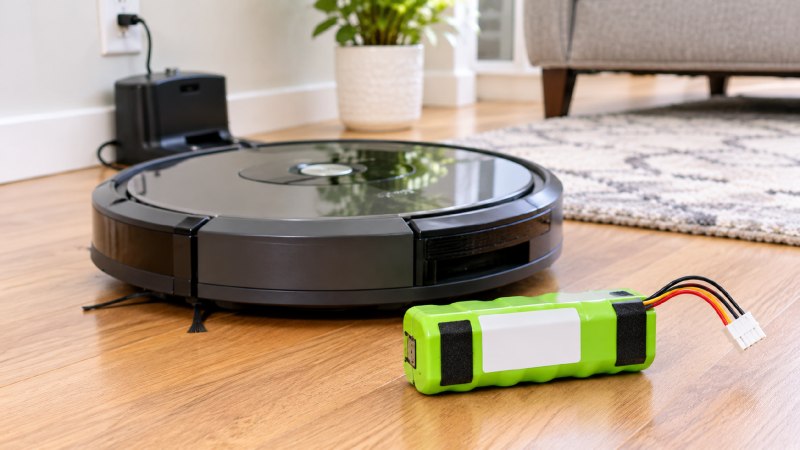
Few home gadgets get replaced as quickly as a robot vacuum that seems to have stopped trying. It wanders off mid-room, gives up before the hallway, and sits blinking somewhere under the sofa. Owners often read that as old age and start looking at new models, when the motors and brushes may have years left in them.
A Roomba battery replacement costs a fraction of a new robot, and it is one of the simplest repairs in the house. The difficult part is choosing the right pack, because iRobot has used several different batteries over the years and they are not interchangeable. This guide walks through the model families, the capacity trade-offs, and a few checks to run first.
Why Roomba battery replacement starts with the series number
Series first. As battery seller Accessories-Mall sets out on its Roomba page, ABL-D1 fits i7/j7/i4/e5; ABL-D2 adds Combo and j-series support. Flip the robot over and read the model label, then look at the printed code on the old pack. Those two numbers together will settle the question faster than any compatibility chart.
Do not trust a listing that simply says “fits Roomba”. Older and newer robots use different shapes and connectors, so a generic description tells you very little about whether the pack will seat properly in your machine.
Where it stops: iRobot revises its range often, and this guide cannot cover every future release. Newer robots may need a part that is not listed here, so confirm against the current listing.
Classic round robots from the older generations
Older machines are easy. One form factor spans several generations. The 4376392 (3300mAh / 48Wh) Li-ion battery fits virtually every Roomba from the 500 series through the 980. If you own one of these, you may also be in for a small surprise. Older 500–800 series originally shipped with NiMH batteries, so a lithium replacement can be a real step up in runtime.
Lithium also ends the old habit of running a pack flat. Nickel cells were fussy. Lithium is happy with short top-ups, which suits a robot that goes back to its dock whenever a job ends.
Where it stops: a stronger battery cannot rescue worn wheels or a dead brush motor. If an old robot also grinds or pulls to one side, price those repairs before ordering a pack.
The s9, and why it stands alone
The s9 is different. The premium s9 series uses a unique battery — the ABL-B — and it is not interchangeable with other families. Any owner who assumes an i-series pack will do is headed for a return. Check that the listing names the s9 or s9+ specifically, and do not rely on a similar voltage to settle the matter.
Mechanical fit decides this one. Voltage matches across the whole range, which means a quick look at the label will happily reassure you, the parcel will arrive on time, and only when you open the robot will you find a pack that cannot possibly seat in that bay.
How much capacity you actually need
Bigger is not always better. According to the seller, battery capacity ranges from 32Wh (ABL-D2 standard) to 64.2Wh (ABL-F high-capacity), translating to 60–180 minutes of cleaning per charge. Larger homes and thick carpets gain the most from the top of that range, while a small apartment may never notice the difference.
One warning applies to Combo owners in particular. The ABL-F is NOT compatible with Combo models, so that upgrade is off the table for them however appealing the runtime looks. A pack holding 4460mAh / 64.2Wh is only a bargain if your robot can use it. Treat the compatibility list as a hard limit and keep capacity as a second question.
Where it stops: runtime figures vary with floor type and cleaning mode. Thick rugs and top suction settings use energy much faster, so treat every published number as a best case.
Original or aftermarket, and what the price gap means
Price sells these. The seller’s comparison shows the ABL-D1 at around $109.99 from the original maker against $59.99 for its aftermarket version. It also states plainly that these are aftermarket batteries, not parts made by iRobot, which is the kind of honesty you should expect from any listing. Be cautious with anything claiming to be genuine at a far lower price.
When comparing, weigh the warranty alongside the price. A pack with a written guarantee and a reachable seller is a safer choice than a slightly cheaper one sold through a marketplace page that vanishes in six months. Compare cell chemistry and protection features as well, and do not buy on a capacity claim alone.
Where it stops: third-party parts vary, and no seller’s promise is the same as a lab test. Keep the receipt, and run the robot through a full cycle on the day the pack arrives.
Check this before you order
Short runs mislead. The seller’s FAQ lists an aging battery as one common cause when a robot dies mid-clean, alongside dirty charging contacts and cleaning areas that exceed the remaining battery capacity. Those last two can be fixed for free. Pet hair and dust build up on the contact strips quickly, and a poor connection means the robot never reaches a true full charge.
- Wipe the contacts on the robot and the dock with a dry cloth.
- Clear hair from the brushes and wheels, since drag makes the motors work harder.
- Empty the bin and clean the filter before you time a run.
- Move the dock to an open spot with a strong Wi-Fi signal.
- Run one full cycle and note how long it lasts.
If runtime is still poor after all that, you can order with confidence.
Fitting the pack and looking after it
Fitting takes only a few minutes for most models. Turn the robot over on a soft towel, remove the screws on the battery door, lift the old pack out by its tabs, and drop the new one in with the labels facing the same way. Then replace the door and leave the robot on the dock for a full charge before its first run.
Afterwards, keep the robot cool. If you are going away for a long stretch, take it off the charger and store it partly charged, and if the dock has ended up wedged behind a radiator cover because that was the only spot with a free socket, move it now, since heat is the main thing that shortens battery life.
Keep the old pack out of the trash. The US Environmental Protection Agency warns that a discarded lithium-ion battery may be crushed in transport and start a fire. It advises placing each one in a separate plastic bag with non-conductive tape over the terminals, then taking it to a recycler. Many hardware and electronics stores run collection bins.
Begin with your robot’s label and the code on its old pack. Specialist stores such as Accessories-Mall sort Roomba batteries by series, and their support team will check the match against a photo if you are unsure, which is an easy way to avoid sending back a pack that nearly fits.